Public beta · Updated daily · Browser & iPad

The A330 flight deck.
Wherever you are.

Not computer-based training — an in-depth FMS and procedure trainer for the A330, in your browser and on iPad. A working FMS, flight guidance that behaves like the airplane, a crew that makes the calls — and an instructor who knows when to step back.

  • BrowserBeta · on request
  • iPadTestFlight beta · on request
  • App StoreComing soon
  • AndroidIn development
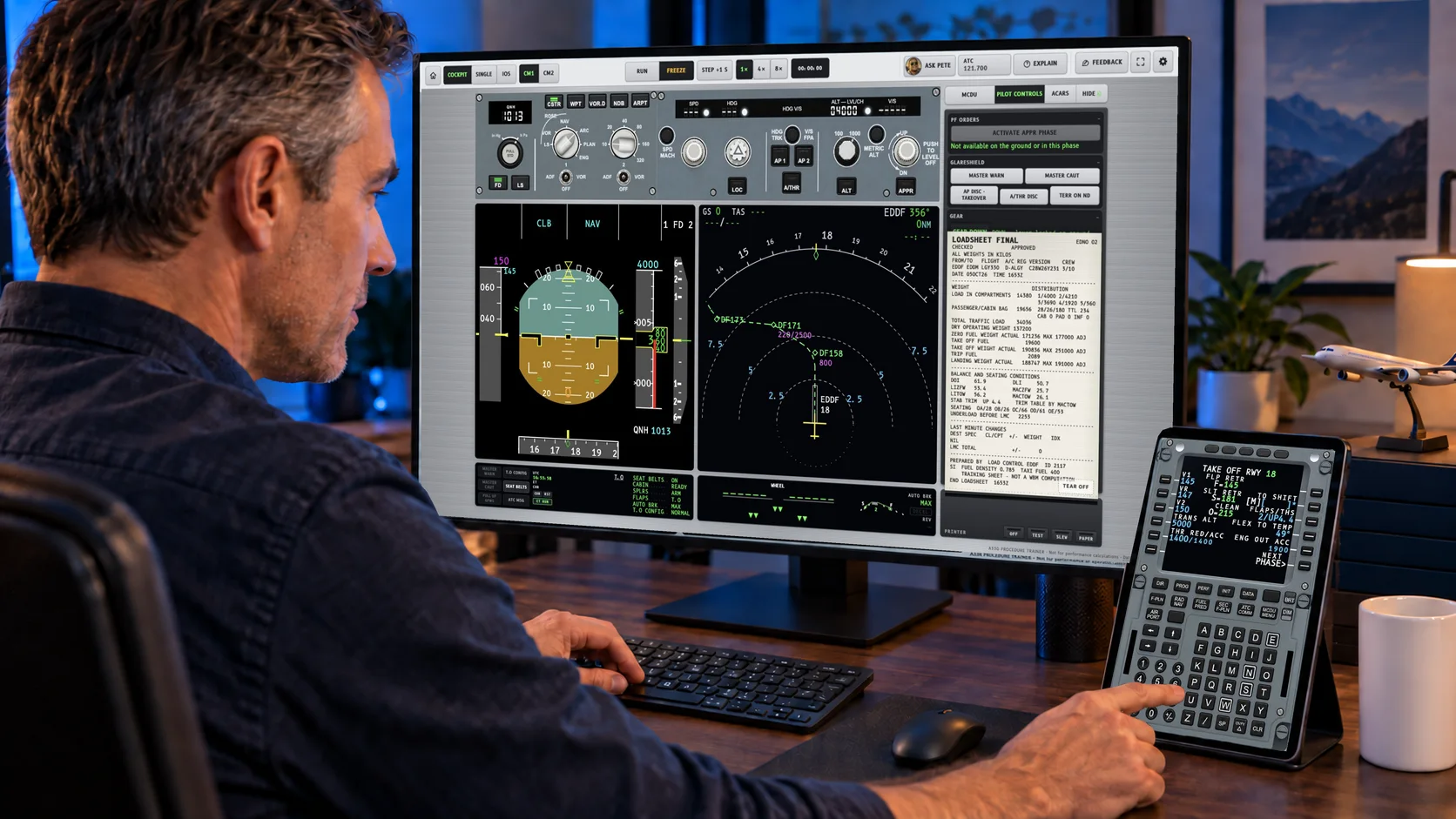
A pilot at a desk with the A330 trainer on a large monitor, the load and trim sheet on the cockpit printer and the MCDU on a separate iPad mini
Real trainer screens · desktop + MCDU Sharing on iPad mini
  • 3ways in: free play, guided lessons, just fly
  • 80+MCDU pages, from INIT A to NAV B/UP
  • 239crew phrases, each in a PF and a PM voice
  • 13ATC stations on the background radio
  • 121explain cards behind the controls
  • 2seats — fly as captain or first officer
Let’s be clear

This is not CBT.
It is a flight deck.

Computer-based training shows you how it works. Here you make it work — on a working FMS, in depth, as long as you want.

Computer-based trainingA330 Procedure Trainer
Slides and videos of the FMSA working FMS — every entry has consequences, down to the FMA
Multiple choiceYou do it, and the airplane answers
One path through a scripted lessonFree play: any flight, any setup, any mistake you want to make
Ends when the module endsNo end — fly it again, differently, from the stand to the runway
One trainer, every place you study

Your desk. Your couch.
Your layover.

No simulator slot, no setup. Open it, pick a lesson, and the airplane is where you left it — on a desktop, a laptop or an iPad.

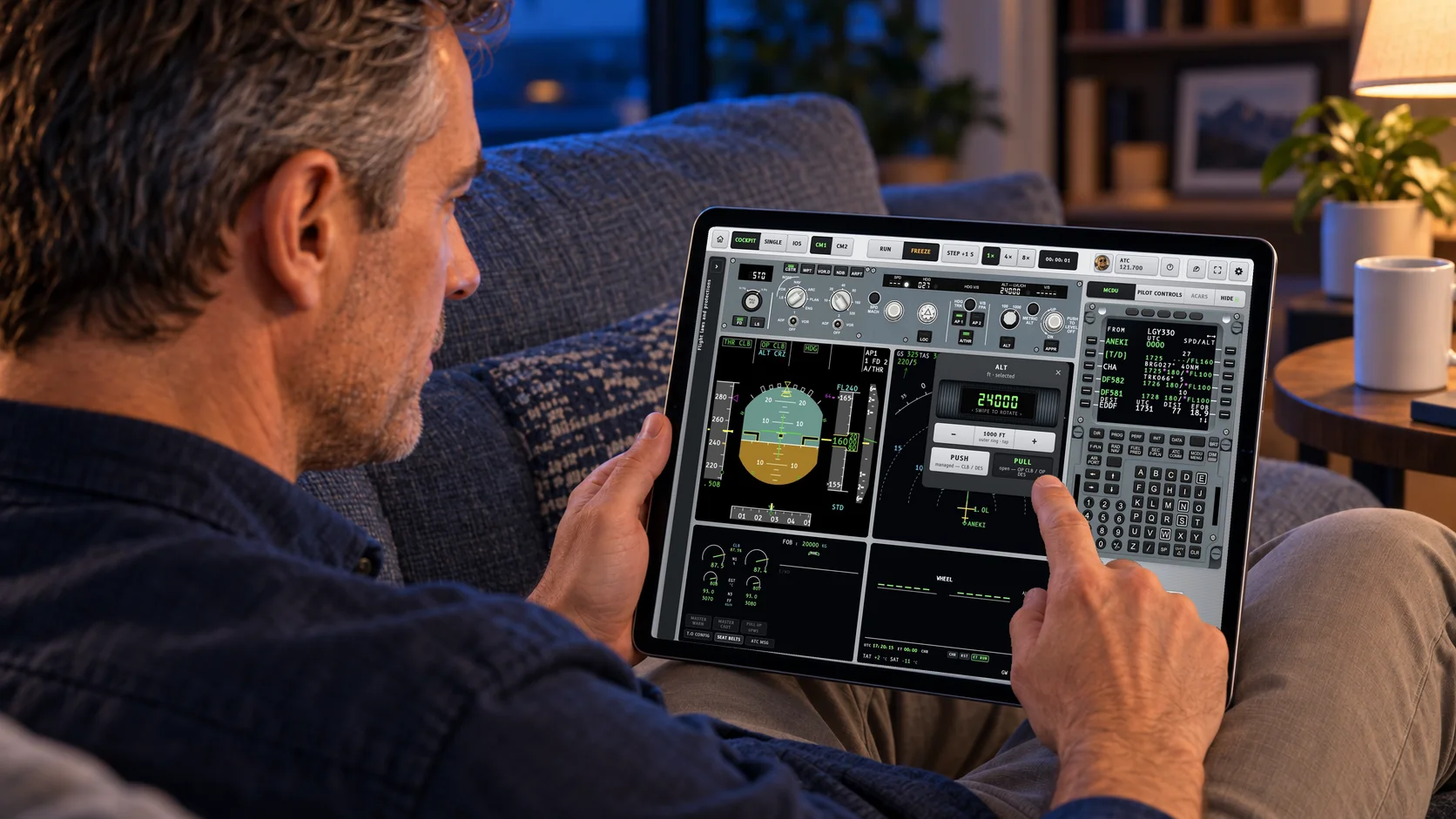
A pilot on a couch with a 13-inch iPad running the A330 Procedure Trainer, selecting an altitude and pulling for OPEN CLIMB
On the couch

The whole flight deck on a tablet.

Set the altitude, pull for OPEN CLIMB and watch the FMA change — on a 13-inch iPad, wherever you have ten minutes. The load & trim sheet, the printer and MCDU Sharing are waiting at your desk.

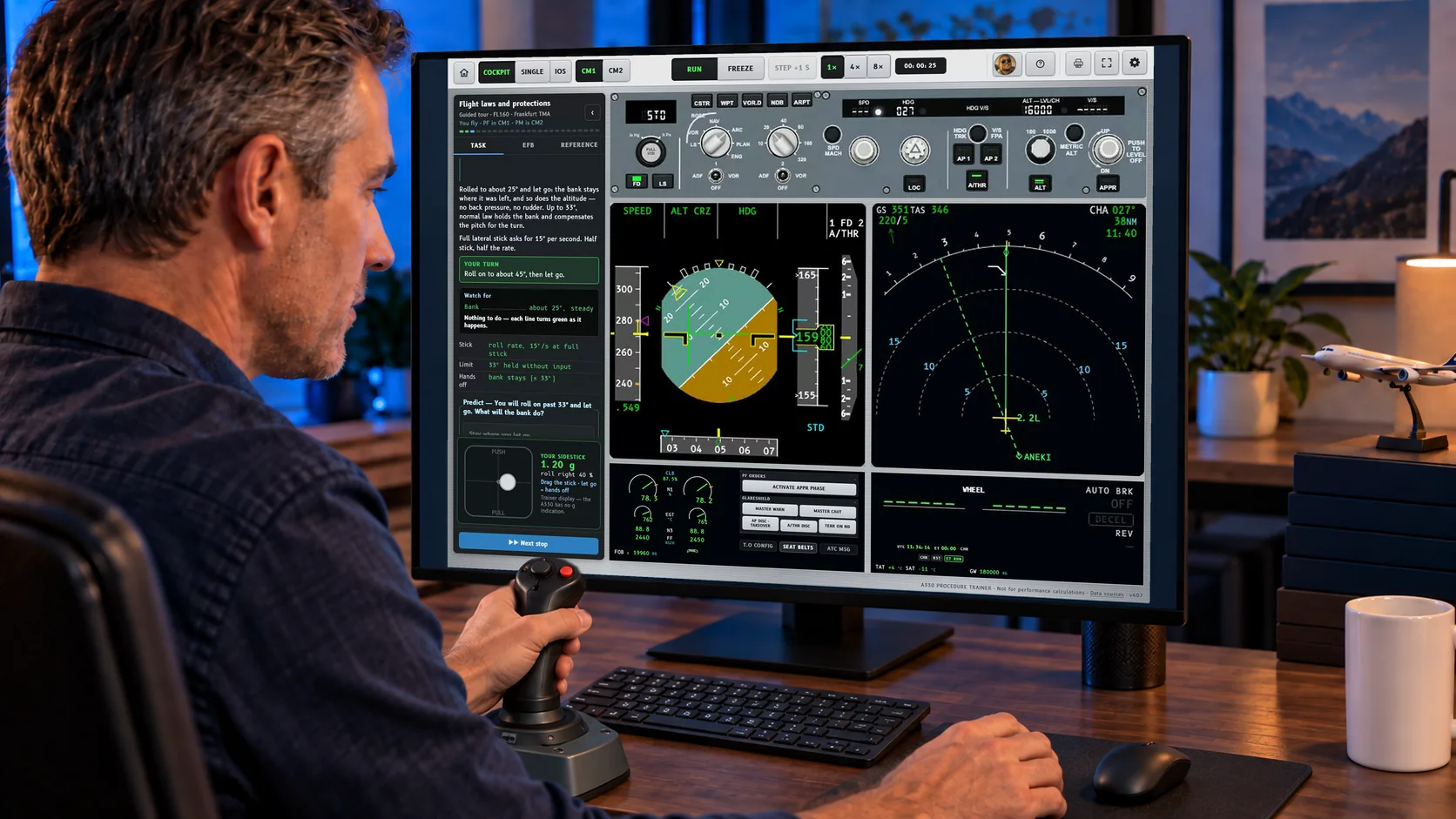
A pilot with a joystick flying the Flight Laws and Protections tour in the A330 trainer
Hands on

Feel what normal law does for you.

In the Flight Laws tour you take the sidestick — a compatible joystick or the stick on screen — and roll into the protections yourself. Let go below 33° and the bank stays. Roll past it, let go — and watch normal law bring it back to 33°.

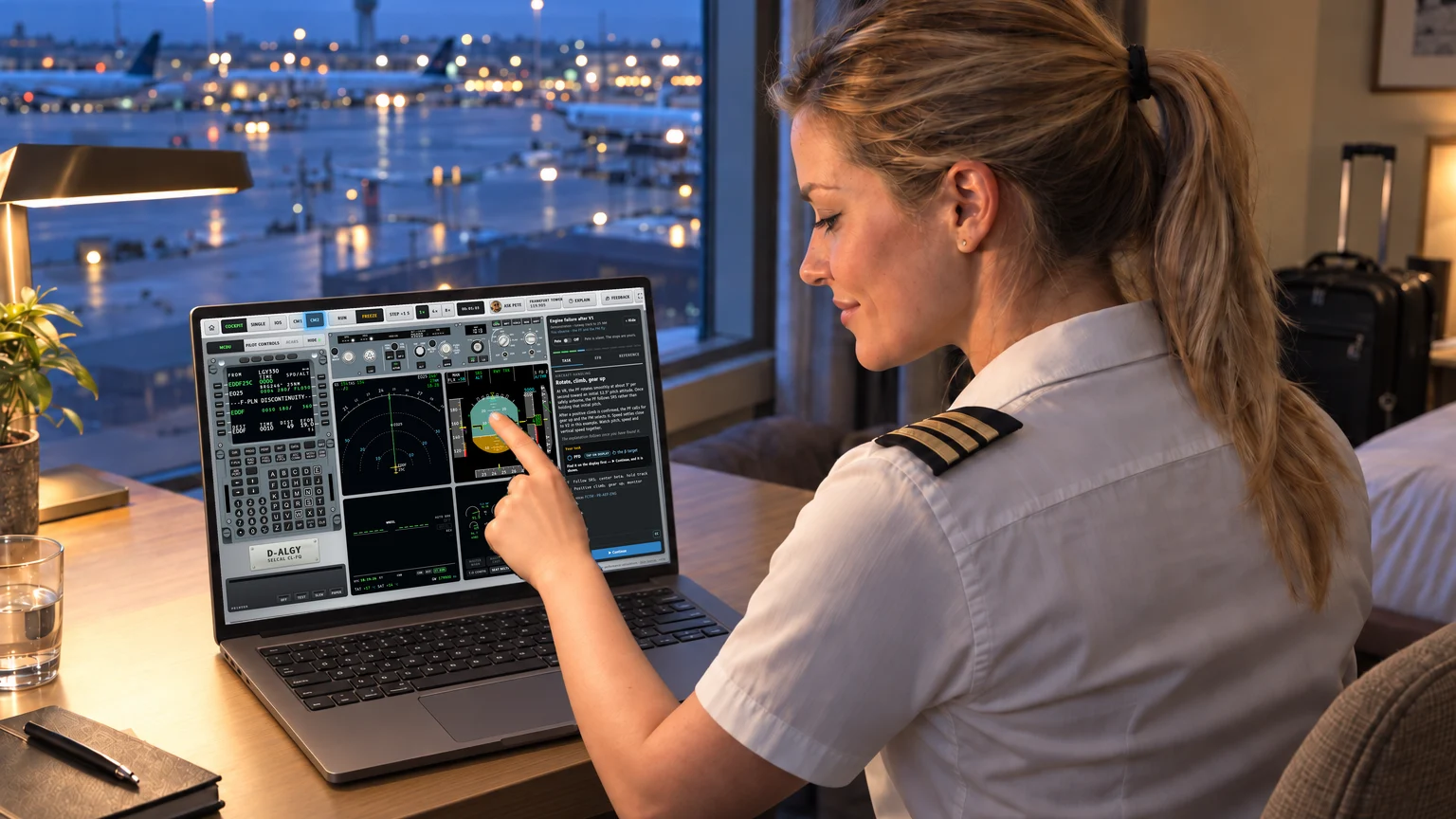
A first officer at a hotel desk on a layover, tapping the PFD on a touch laptop running the trainer in the CM2 seat
On the layover

Sit on the right-hand side.

Switch to CM2 and the whole flight deck mirrors for the first officer: PFD outboard, ND inboard, MCDU toward the pedestal. The crew voices swap with you — you hear the captain from the left. A touch laptop on the hotel desk is all it takes.

How it teaches

Not a slideshow.
A flight deck that teaches.

When you want guidance, the lessons stop where it matters. You look at the real displays, you find the answer yourself — and the debrief shows you exactly what is still open.

01 · PETE SHOWS IT

An instructor at your side.

Pete talks you through each stop, spoken and step by step, pointing at the display that matters. Switch him off and the stops are yours.

02 · YOU FIND IT

Tap the answer on the real display.

TCAS in green on the FMA. The green area on the V/S scale. The β target on the PFD. No multiple choice — only what you find yourself counts.

03 · THE DEBRIEF

Know what is still open.

Each open item takes you back to the exact moment it happened. Your predictions come back with the reason why, plus one take-away to remember.

Grounded in learning science

Built the way pilots actually learn.

One lesson standard for every lesson and mission, written against established research and airline training practice.

  • 4C/IDWhole tasks instead of isolated button drills, with support that fades as you get better — Pete shows, then you do.
  • Retrieval & predictionFind it on the display and predict what the airplane will do before it does it, after the IES practice guide on organizing instruction.
  • NASA checklist researchFlows and checks follow Degani & Wiener’s work on flight-deck checklists (NASA CR-177549).
  • EBT debriefDebriefs built from what was observed — what went well, what is still open — in the spirit of IATA’s evidence-based training guidance.

Informed by these sources — not endorsed by NASA or IATA, and not an approved EBT program.

Three ways in

Cleared
for training.

At its core a fully working FMS and procedure trainer. The guided lessons are an offer, not a track — fly it your way.

Free play · the full trainer

Set it up. Fly it your way.

Build any flight the way you want to train it: position, flight preparation, aircraft, weather, dispatch and ATC, malfunctions, snapshots. Every MCDU page, every FCU mode, the whole procedure from the stand to the runway at the other end — no script, no guide, just you and the airplane.

Guided lessons · optional

Pete takes you through it.

Today’s lineup — a snapshot. New lessons and missions are added almost every day.

  • Flight deck preparationFlow · EDDF at the stand
  • Engine failure after V1Demonstration · Frankfurt 25C
  • TCAS introductionGuided tour · Frankfurt TMA
  • Flight laws and protectionsGuided tour · FL160
  • Terrain warnings and escape maneuverGuided tour
  • Backup navigation after FM failureGuided tour
  • Line flight to MunichFree flight · Frankfurt → Munich
  • Circuit with ILS approachFree flight · Frankfurt
Just fly · for pilots in a hurry

Just hop on and fly.

One runway, lined up, engines running. No setup, no briefing, no radio chatter — push the thrust levers and go. For the ten minutes between two other things.
Real captures

Straight from
the trainer.

Every screen below is a capture of the trainer as it runs today — no mock-ups. Tap to look closer.

Always in development

Never finished.
On purpose.

The trainer grows every day. What you fly today is better than last week — and next week there is more.

Every day

Daily updates.

New behavior, sharper displays, fixes from pilots who fly it. Updates arrive on their own — no download, no reinstall.

All the time

New missions.

Lessons and missions are added continuously, each one checked against the manuals and built around a moment that matters on the line.

On request

A program for your airline.

For any airline in the world we build a tailored program: your SOPs and callouts, your routes and airports, missions shaped around your training.

Everything on board

The feature list.

01FMS & MCDU80+ pages, real procedures for Germany and the US — or your own database
  • INIT A/B, F-PLN, SEC F-PLN, all PERF pages, FUEL PRED, PROG, RAD NAV, DATA and A/C STATUS
  • Lateral and vertical revisions, DIR TO with radial in and out, OFFSET, HOLD, RTA and STEP ALTS
  • SIDs, STARs and approaches from published German (DFS) and US (FAA) procedures, RNP included
  • The German en-route network on the AIRWAYS page
  • Company routes through CO RTE and ROUTE SELECTION
  • Bring your own database: import ARINC 424 data from your data supplier and it merges into the FMS
  • NAV B/UP pages for flying on after an FM failure
  • IRS alignment, POSITION MONITOR, IRS and GPS monitor pages
  • Stored routes and waypoints, FIX INFO, CLOSEST AIRPORTS and wind pages with WIND REQUEST
02Flight guidance, FCU & FMAThe modes behave the way the airplane does
  • Lateral modes: RWY, RWY TRK, NAV, HDG/TRK, LOC, APP NAV, GA TRK
  • Vertical modes: SRS, CLB/DES, OP CLB/OP DES, EXP, ALT, ALT CST, ALT CRZ, V/S, FPA, G/S, FINAL APP
  • Autothrust: MAN FLX, MAN TOGA, THR CLB, THR IDLE, THR LVR, SPEED, MACH, A.FLOOR, TOGA LK
  • ILS approaches through LAND, FLARE and ROLL OUT, CAT 3 DUAL
  • Normal, alternate and direct law, with the protections
  • AP/FD TCAS mode for resolution advisories
  • FCU, EFIS control panel, MCDU and DCDU built on photographic faceplates
  • Explain mode: long-press any control for its reference card
03Crew & calloutsA PF and a PM who work like a crew
  • A virtual pilot flying and pilot monitoring with the standard callouts and FMA calls
  • 239 crew phrases, each recorded in a PF and a PM voice
  • Two callout profiles: PM confirms with CHECKED, or reduced callouts
  • Give the flap order — the PM checks the speed and sets the lever, or says SPEED TOO SLOW
  • The voices follow your seat: captain on the left, first officer on the right
  • 43 aircraft aurals: radio altitude calls, RETARD, GPWS and TCAS
  • The engine failure dialogue: ENGINE FAILURE, ECAM ACTIONS, the confirm calls
  • Subtitles for every call
04ATC, radio & CPDLCA busy frequency, a working DCDU — and real-time METAR
  • Background radio from 13 stations: Frankfurt and Munich Delivery, Ground, Tower and Arrival, Langen, München, Rhein, Bremen, Maastricht
  • The radio follows the frequency set on RMP 1, VHF 1
  • Spoken ATC instructions to your own aircraft, with crew readbacks
  • CPDLC on the DCDU: logon, NEXT ATC handover, CLIMB TO, DIRECT TO and CONTACT with WILCO, UNABLE and STBY
  • Departure and oceanic clearances by datalink
  • AOC: INIT REQUEST flight plan uplink and the loadsheet
  • Real-time METAR and TAF from aviationweather.gov by AOC weather request — or the scenario weather and reports your instructor sets
  • TCAS TA/RA training encounters and traffic on the ND
05AbnormalsFailures, warnings and an engine that quits after V1
  • Failures set by the instructor: ILS LOC or G/S, RA 1/2, A/THR, FM 1/2, alternate or direct law, NAV B/UP
  • Failures armed to trigger below a set height
  • GPWS modes 1–5, TERRAIN AHEAD, TOO LOW TERRAIN and terrain on the ND
  • Engine failure after V1 with ECAM dialogue, a PAN PAN call and the frequency change
  • Find it, predict and debrief in every guided lesson
06Instructor stationLive weather, freeze, rewind — set it up your way
  • RUN, FREEZE, STEP +1 s and 1×, 4×, 8× time
  • Reposition to 1,000 ft or 2,500 ft on final, or 14 NM out; slew on a map
  • Live weather download: the forecast along your route — winds and temperatures aloft into the flight model, surface weather into the scenario
  • Live METAR and TAF for origin, destination and alternate — one tap puts the real origin weather into the scenario
  • Weather by hand: wind, QNH and temperature, your own METAR and TAF
  • Snapshots every 30 s, rewind 2 or 5 minutes, resume your last session
  • Recall of every input; a debrief with FMA history, callouts and datalink log
  • Build, save, export and import your own lessons
  • Pete: 241 spoken lines across the guided lessons — and Ask Pete for answers with handbook references
07Devices & setupBrowser, iPad, a second screen for the MCDU
  • Runs in the browser on desktop and laptop, and installs as a web app
  • iPad layout, plus a native iPad app in TestFlight beta
  • MCDU Sharing: pair a second device by QR code — encrypted, peer to peer
  • Captain or first officer seat (CM1 / CM2) with a mirrored flight deck
  • Compatible joystick or on-screen sidestick in the Flight Laws tour
  • A330-900 with Trent 7000 engines; A330-200 and -300 weight profiles
08Sources & limitsWhat it is built on — and what it is not
  • A built-in reference manual in the trainer’s own words
  • Lesson design informed by 4C/ID, the IES practice guide, NASA CR-177549 and IATA EBT guidance — not endorsed by them
  • Navigation data from public sources: DFS (Germany), FAA CIFP (US) and OurAirports — not current, not certified, not for navigation
  • Terrain from Copernicus GLO-90, in regional tiles
  • Speeds and FLEX come from a training model — not for performance calculations
  • All voices are synthetic; Ask Pete answers are AI-generated
  • Not built: overhead panel, interactive ECAM, weather radar
Built by an instructor
Procedures first. The why behind every mode. And a crew that works like a crew.

The trainer is designed by Frank Uhdris — airline pilot, and for many years a type rating examiner and instructor. It teaches the way a good sim session does: show it once, let you find it, then ask what you would do next.

Hear the takeoff.

25 seconds from the trainer: thrust set, the crew calls and the frequency in the background.

For airlines & training organizations

Your procedures.
Your pilots.

An operator area turns the trainer into your own: your documents, your routes, shared with your crews. And on request we build a complete program for your airline — wherever in the world you fly. Ideal before a type rating, between sim sessions and for recurrent preparation.

Talk to us
  • Your manuals on boardUpload your PDFs; pilots open them right next to the flight deck.
  • Bring your own databaseImport ARINC 424 data from your supplier — it merges into the FMS. Company routes as CSV or JSON.
  • Share with your pilotsOne setup, handed to every pilot in your program.
  • Lessons you buildSet up scenarios in the instructor station, save them, export them, hand them out.
  • A program built for youYour SOPs and callouts, your airports, missions around your training needs — tailored on request.
Access

Request
your seat.

The trainer is in public beta. Tell me who you are and how you want to fly it — I will send you your access.

BrowserBeta · access on request
iPad appTestFlight beta · on request
App StoreComing soon
AndroidIn development

Your details reach me by email through Netlify and Resend, only to answer your request. Privacy